
Compare a controlled register with the delivery folder using one declared matching rule. Treat files with no register expectation as unexpected, and treat multiple files satisfying one expectation as ambiguous. Review every candidate path, document number and revision before removing or accepting anything; similar names do not always mean duplicate content.
Folder totals are weak evidence. A package with 500 expected rows and 500 files can still contain one missing deliverable and one unwanted extra. The useful check is row by row.
Define the comparison rule
Use exact filenames when the register carries the complete agreed name. Use document-number matching when filenames contain variable descriptions but retain a controlled identifier. Do not switch rules halfway through the report to make exceptions disappear.
Understand the result types
| Result | Meaning | First question |
|---|---|---|
| Ready | One file satisfies one expectation | Does the file also pass the required content and revision checks? |
| Missing | No file satisfies the expectation | Was it omitted, renamed or placed outside the boundary? |
| Unexpected | A file satisfies no register expectation | Is it a valid unregistered deliverable, support file or unwanted copy? |
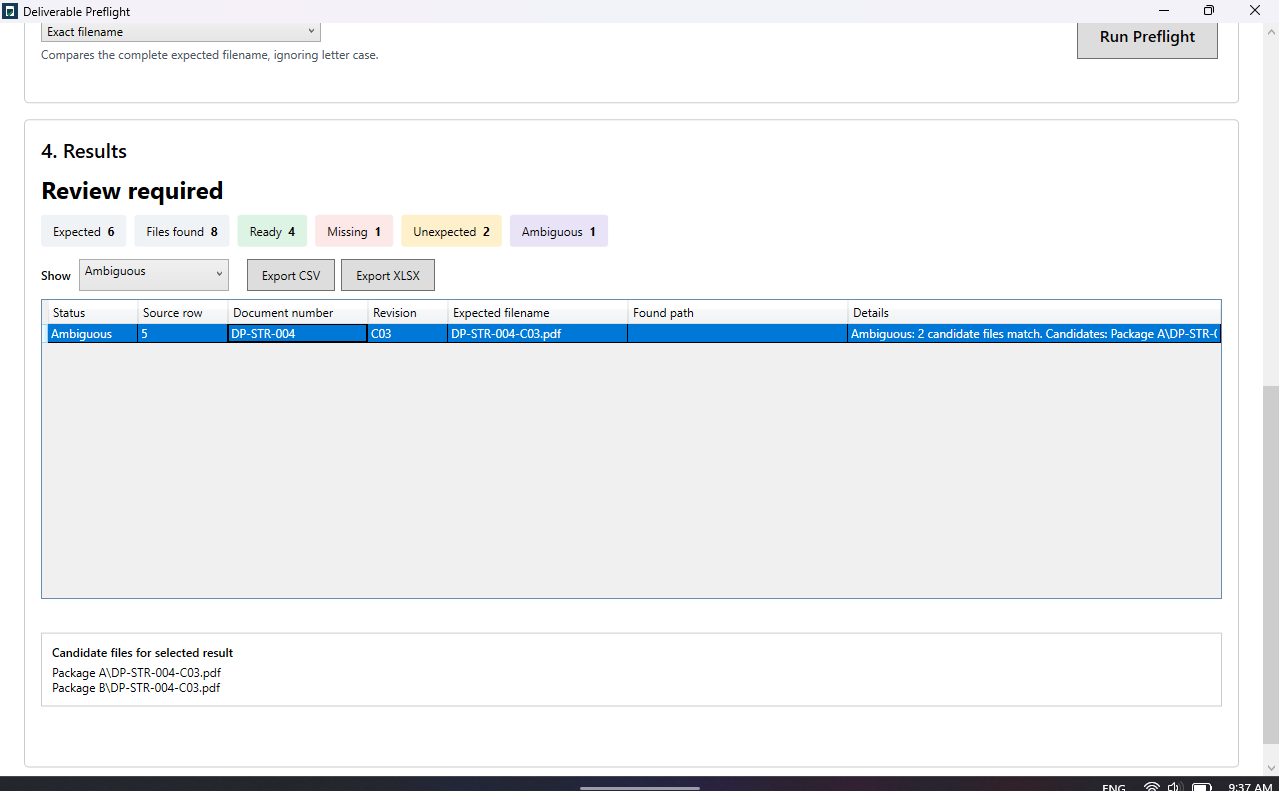
| Ambiguous | Several files satisfy one expectation | Are they revisions, duplicates or different documents sharing a token? |
Why ambiguous is not the same as duplicate
Two candidates may have the same document number but different revisions, file extensions or descriptive suffixes. They may also be genuinely different sheets that use an insufficiently specific number. A matching tool should show both paths and leave the classification to the user.
Investigate unexpected files safely
Unexpected files commonly include transmittals, readme notes, thumbnails, temporary exports, old revisions and legitimate documents missing from the register. Do not bulk-delete them. Classify each item and correct either the controlled register or the package under the agreed procedure.
Check subfolders deliberately
Including subfolders may reveal duplicates stored under discipline, revision or working directories. Excluding them may hide valid deliverables. Record the chosen boundary and rerun the same scope after corrections.
Resolve and repeat
- Review every candidate path.
- Confirm document identity and revision from the controlled source.
- Correct the register or package without rewriting the report.
- Run the comparison again.
- Preserve the final full result, including Ready rows.
When Deliverable Preflight helps
This is the workflow Deliverable Preflight is designed for. It scans only the local locations the user selects, reports all four outcomes and exports the complete comparison to CSV or XLSX. It does not upload, rename, move or delete the source files.
Run the check locally on Windows and inspect the evidence before the package leaves your control.
View Deliverable Preflight in Microsoft Store →Related guides
Start with checking a register against a folder and compare the two matching modes.
Questions people ask
What is an unexpected file?
It is a scanned file that does not satisfy any expectation in the selected register under the chosen matching rule.
What is an ambiguous file match?
It occurs when more than one scanned file satisfies a single register expectation, so the tool cannot safely identify one unique result.
Should unexpected files be deleted?
Not automatically. Investigate whether they are support files, old revisions, duplicates or valid deliverables missing from the register.